Creating Multi-ROIs from Regions of Interest
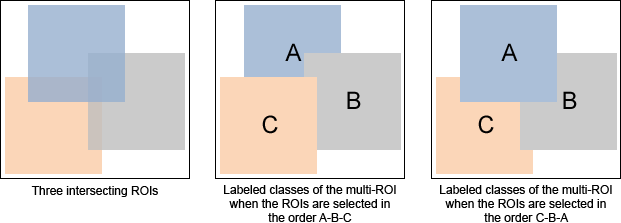
In a number of workflows, such as labeling a dataset for training a deep model, the required output is a multi-ROI. However, you can still choose to work with multiple regions of interest, from which you can create a multi-ROI or dense multi-ROI. You can also create multi-ROIs from the results of segmentations made with the Histographic Segmentation tool or from previous results produced with the Segmentation Trainer. You should note that whenever you create a multi-ROI from multiple regions of interest, labeled voxels that intersect will be removed from the multi-ROI based on the order that the regions of interest were selected in the Data Properties and Settings panel.
As shown in the following illustration, in which the labeled voxels of three regions of interest intersect, the selection order determines how labeled voxels are distributed in the resulting classes of the multi-ROI.
Intersecting ROIs and resulting multi-ROIs
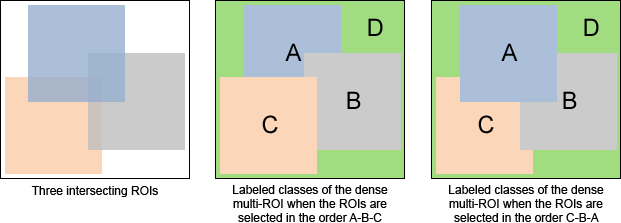
A dense multi-ROI is a multi-ROI in which the labeled voxels of each selected ROI is assigned to a class and all unlabeled, or 'complementary' voxels, are labeled as an additional class. For example, if you create a dense multi-ROI from three regions of interest, then the multi-ROI will contain four classes and will be fully segmented.
As shown in the following illustration, in which the labeled voxels of three regions of intersect, the selection order determines how labeled voxels are distributed in the resulting classes of the dense multi-ROI.
Intersecting ROIs and resulting dense multi-ROIs
 How to Create a Multi-ROI from Regions of Interest
- Create a new region of interest for each class that you want to include in the multi-ROI (see Creating New Regions of Interest).
- Label the voxels that correspond to a single class on each region of interest.
For example, you may need to label voxels that correspond to a specific material type, phase, or to an anatomical structure.
Note You can use any of the segmentation tools available on the ROI Painter and ROI Tools panels to label the regions of interest (see Segmentation Tools).
- Select the required regions of interest on the Data Properties and Settings panel, right-click, and then do one of the following:
- Choose Create Multi-ROI from ROIs in the pop-up menu.
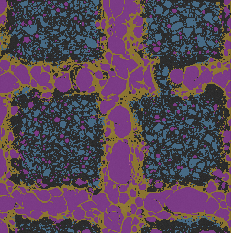
A new multi-ROI, in which the labeled voxels of each selected ROI is assigned to a different class, appears on the Data Properties and Setting panel. For example, if you created a multi-ROI from three regions of interest, then the multi-ROI will contain three classes, as shown below.
- Choose Create Dense Multi-ROI from ROIs in the pop-up menu.
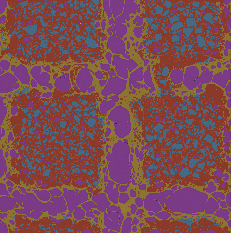
A new multi-ROI, in which the labeled voxels of each selected ROI is assigned to a different class and all unlabeled voxels are a assigned to an additional class, appears on the Data Properties and Setting panel. For example, if you created a multi-ROI from three regions of interest, then the multi-ROI will contain four classes, as shown below, and will be fully segmented.
- Choose Create Multi-ROI from ROIs in the pop-up menu.
